

Set online-mode=false in the server.properties file (GamePanelFiles), with the server stopped, then restart it. Players without an official Minecraft account can then connect. Also install an authentication plugin, otherwise anyone can take someone else's username. This only applies to Minecraft Java: Bedrock doesn't have this setting.
In the GamePanel, stop the server.
Open GamePanelFilesserver.properties.
Replace
online-mode=truewithonline-mode=false. From 1.19.1 onward, also setenforce-secure-profile=false.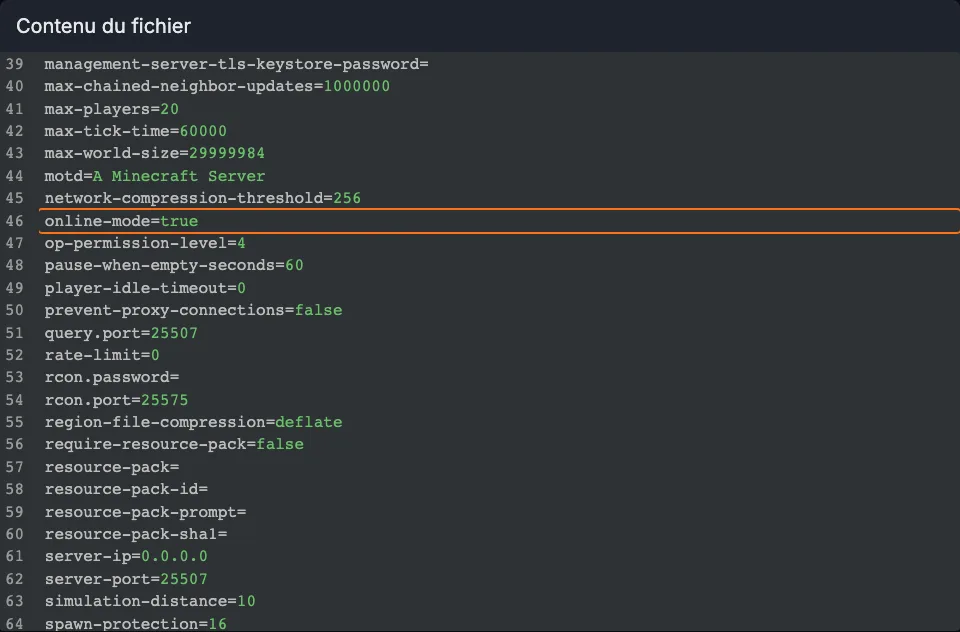
server.properties file open in the GamePanel, with the online-mode line highlighted Click "Save File", then start the server.
On Paper or Spigot, install an authentication plugin (AuthMe Reloaded or nLogin): each player sets a password on their first connection (
/register), then enters it every time after (/login). See install a plugin. A Vanilla server doesn't accept plugins: switch to Paper first.Network with a proxy (Velocity or BungeeCord): cracked mode is set on the proxy (
online-mode = falseinvelocity.toml,online_mode: falsein BungeeCord'sconfig.yml). All servers on the network should switch toonline-mode=falsewith forwarding enabled (Velocity: modern forwarding, same secret key inconfig/paper-global.yml; BungeeCord:bungeecord: trueinspigot.yml), and the authentication plugin goes on the proxy.
Common errors
- "Lost" inventories and progress: in cracked mode, a player no longer has the same identifier (UUID) as in official mode. Players who already played start from scratch. Switch to cracked mode as soon as you create the server if possible. To get them back: inventory lost after a restart.
- Impersonated usernames: without an authentication plugin, anyone can connect with an operator's username and take their permissions.
- Chat errors or disconnects on the first message:
enforce-secure-profileis still set totrue. - "Failed to verify username" despite the change: the file wasn't saved, or the server wasn't restarted.